
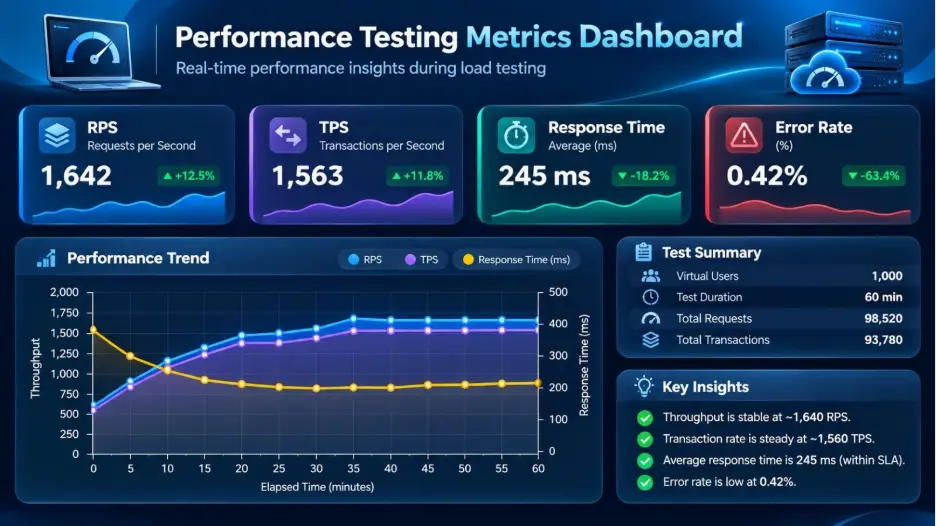
When an application experiences increasing traffic, its ability to process requests efficiently becomes critical. A website may load correctly for a few users but struggle when hundreds or thousands of people access it simultaneously. This is where throughput becomes an important performance metric.
Throughput helps development and testing teams understand how much work an application can successfully handle within a given period. It also provides useful insights into system capacity, scalability, and potential performance bottlenecks.
Understanding how throughput works, how to measure it, and how to improve it can help businesses build applications that remain reliable under demanding workloads.
What Is Throughput in Performance Testing?
Throughput in performance testing refers to the amount of data, requests, or transactions a system successfully processes within a specific period. It is commonly measured in requests per second (RPS), transactions per second (TPS), or megabytes per second (MB/s).
For example, consider an eCommerce application during a promotional sale. Hundreds of customers may browse products, add items to their carts, and complete purchases simultaneously. If the application successfully processes 500 requests per second, its throughput is 500 RPS.
A higher throughput generally indicates that a system can process more work. However, it does not automatically mean that the application delivers a good user experience. Response time, error rate, and resource utilization must also be considered.
Why Is Throughput Important in Performance Testing?
Throughput provides valuable information about how an application behaves under different workloads. It helps teams evaluate whether their infrastructure and software can support current and future business demands.
Here are some key reasons to monitor it:
- Understand application capacity
Throughput helps determine how many requests or transactions an application can handle before performance starts to decline. This information is useful when estimating infrastructure requirements and setting realistic capacity expectations.
- Identify performance bottlenecks
A sudden drop or plateau in throughput during load testing may indicate limitations in database queries, server resources, network connections, or application code.
- Evaluate scalability
As concurrent users increase, throughput should ideally increase as well. Monitoring this relationship helps teams understand whether an application can handle growing workloads efficiently.
- Support reliable user experiences
An application that cannot process requests efficiently may cause delays, failed transactions, or service interruptions. Monitoring throughput alongside response time and error rates helps teams identify these issues before they affect users.
How Is Throughput Measured in Performance Testing?
Throughput is measured by tracking the number of successfully processed requests or transactions over a specific period.
A basic formula is:
Throughput = Successfully completed requests or transactions ÷ Time taken
For example, if an application successfully completes 12,000 requests in 60 seconds:
Throughput = 12,000 ÷ 60 = 200 requests per second (RPS)
Depending on the application and testing objective, teams may use different measurement units:
- Requests per second (RPS): Number of requests processed every second.
- Transactions per second (TPS): Number of completed business transactions per second.
- Data throughput (MB/s): Amount of data transferred within a second.
It is important to distinguish successful transactions from attempted requests. Failed or incomplete operations should not be counted as successfully processed work when evaluating application capacity.
Throughput vs. Response Time: What’s the Difference?
Throughput and response time are closely related performance testing metrics, but they measure different aspects of an application’s behavior.
| Metric | What it measures |
| Throughput | Amount of work completed within a specific period |
| Response time | Time taken to respond to a request |
| Latency | Delay before a response begins or data becomes available |
| Error rate | Percentage of requests that fail |
For example, an application might process 500 requests per second while taking five seconds to respond to individual requests. Although its throughput appears high, users may still experience delays.
This is why teams should evaluate throughput alongside response time, latency, and error rates rather than treating any single metric as a complete measure of performance.
How to Test Throughput Effectively
A structured testing approach helps teams understand how much workload an application can handle and where its limitations begin.
- Define realistic workloads
Identify expected user activity, transaction volumes, concurrent users, and peak traffic conditions. Use realistic scenarios rather than generating random requests that do not reflect actual usage.
- Establish baseline performance
Measure application throughput under normal operating conditions. This provides a reference point for comparing results as workload increases.
- Gradually increase the load
Simulate increasing numbers of users and requests to observe how throughput changes. This helps identify the point where processing capacity stops increasing or begins declining.
- Monitor system resources
Track CPU utilization, memory consumption, database performance, network activity, response times, and error rates. These metrics help reveal the factors affecting throughput.
- Analyze and repeat
Review test reports, identify bottlenecks, implement improvements, and run the tests again. Consistent performance testing practices help teams validate improvements and maintain application reliability.
Common Factors That Affect Application Throughput
Several technical and infrastructure-related factors can influence how much work an application processes.
- Server capacity: Limited CPU, memory, or processing resources can restrict request handling.
- Database performance: Inefficient queries, connection limits, and database locks can slow transaction processing.
- Network limitations: Bandwidth restrictions and network latency can affect data transfer.
- Application code: Poorly optimized logic and unnecessary processing can reduce efficiency.
- Concurrent user load: A high number of simultaneous requests can overwhelm application resources.
- Infrastructure configuration: Poor resource allocation and inadequate scaling strategies can limit system capacity.
Addressing these issues may involve query optimization, caching, load balancing, infrastructure upgrades, or improvements to application architecture.
Best Practices to Improve Throughput
Improving throughput requires more than increasing server resources. Teams should identify the actual performance constraints and address them systematically.
- Optimize database operations: Improve query execution, indexing, and connection management.
- Implement caching: Reduce repeated processing and unnecessary database requests.
- Use load balancing: Distribute incoming traffic across multiple application servers.
- Automate performance checks: Integrate automated testing workflows into development and release cycles to identify performance regressions earlier.
- Scale infrastructure: Use appropriate cloud resources and scalable infrastructure management to support changing workloads.
- Monitor continuously: Track performance trends and use DevOps process improvements to strengthen deployment and monitoring practices.
Conclusion
Throughput is an important indicator of how efficiently an application processes requests and transactions under different workloads. By measuring it alongside response time, latency, and error rates, development teams can better understand application capacity, identify bottlenecks, and make informed performance improvements.
Regular performance testing helps businesses prepare for traffic growth, maintain application reliability, and deliver consistent digital experiences. The goal is not simply to achieve higher throughput, but to process workloads efficiently without compromising system stability or user experience.